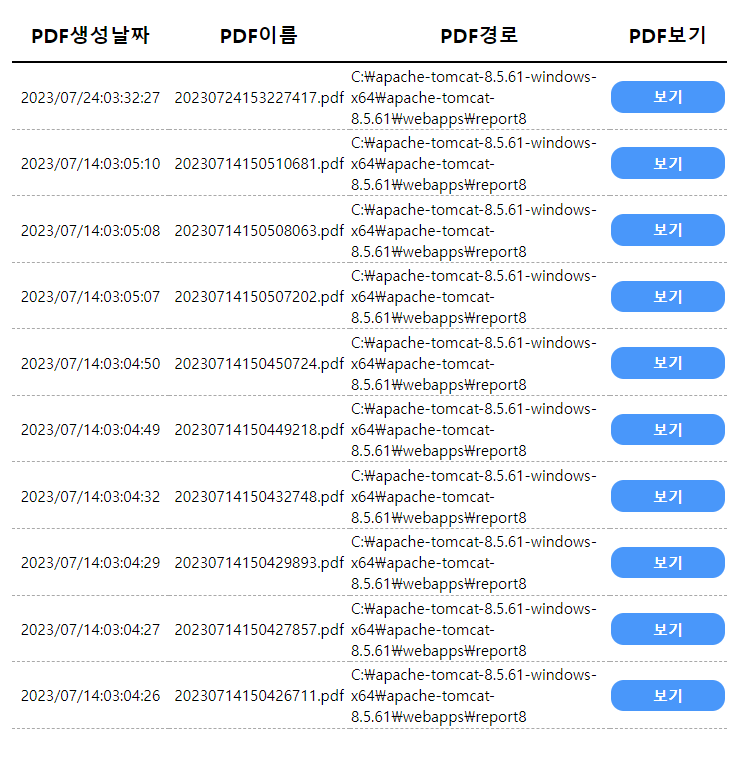
대부분의 웹페이지들은 DB로부터 데이터를 전달받아 웹화면에 출력하여 우리에게 보여준다.
JSP에서 데이터베이스(DB) 데이터는 아래와 같이 코드를 작성하여 내려받을 수 있다.
▶JSP에서 라이브러리 import 및 변수 선언
<%@ page language="java" contentType="text/html; charset=UTF-8" pageEncoding="UTF-8"%>
<%@ page import="java.sql.DriverManager"%>
<%@ page import="java.sql.Connection"%>
<%@ page import="java.sql.Statement"%>
<%@ page import="java.sql.ResultSet"%>
<%!// 변수 선언
	Connection conn = null;
	Statement stmt = null;
	ResultSet rs = null;
	String uid = "jason";
	String pwd = "0010";
	String url = "jdbc:oracle:thin:@localhost:1521:Jason";
	String sql = "select * from pdftable order by pdfdate desc";

%>
이 방법은 JSP에서 DB 접속을 시도하여 DB로부터 데이터를 내려받는 방법이다.
따라서 JSP에서 DB 접속을 할 수 있도록 접속 정보를 변수에 담는다.
Connection conn = null;
Statement stmt = null;
ResultSet res = null;
String uid = " DB접속 ID"
String pwd = "DB접속 비번"
String url = "데이터베이스 URL"
String sql = "데이터 조회 sql문"
▶ HTML에서 출력
<div id="tableSection">
		<%
			try {
			// 데이터베이스를 접속하기 위한 드라이버 SW 로드
			Class.forName("oracle.jdbc.driver.OracleDriver");
			// 데이터베이스에 연결하는 작업 수행
			conn = DriverManager.getConnection(url, uid, pwd);
			// 쿼리를 생성gkf 객체 생성
			stmt = conn.createStatement();
			// 쿼리 생성
			rs = stmt.executeQuery(sql);
		%>

		<table id="pdfTable" border="1">
			<tr>
				<td class="pdfdate title">PDF생성날짜</td>
				<td class="pdfname title">PDF이름</td>
				<td class="pdfpath title">PDF경로</td>
				<td class="pdfview title">PDF보기</td>
			</tr>
			<%
				while (rs.next()) {
			%>
			<tr class="non-active">
				<td class="pdfdate content"><%=rs.getString("PDFDATE")%></td>
				<td class="pdfname content"><%=rs.getString("NAME")%></td>
				<td class="pdfpath content"><%=rs.getString("PATH")%></td>
				<td class="pdfview contetn">
					<button type="button" class="pdfviewer" onclick="view_PDF();">보기</button>
				</td>
			</tr>
           <%
				pdfViewe_num++;}
			} catch (Exception e) {
				e.printStackTrace();
			} finally {
				try {
					if (rs != null) {
					rs.close();
				}
				if (stmt != null) {
					stmt.close();
				}
				if (conn != null) {
					conn.close();
				}
			} catch (Exception e) {
				e.printStackTrace();
			}
		}
			%>
		</table>

	</div>
▶ 결과